Corporate Business Card Print Layout Guide
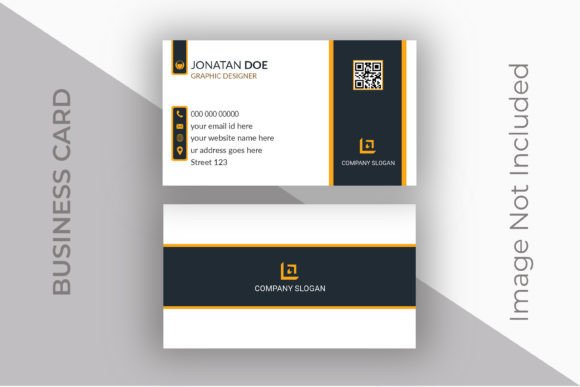
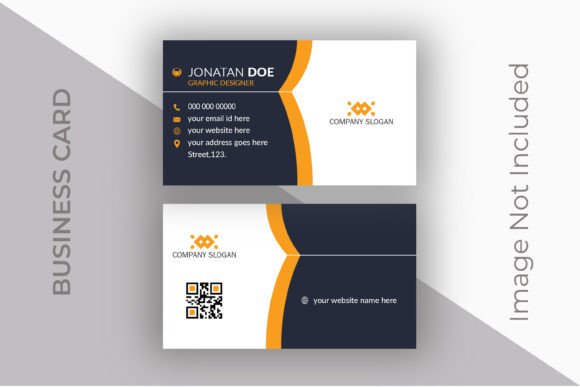
In the fast-paced world of professional networking, the first impression is often the most lasting one. A Corporate Business Card Print Layout serves as the tangible handshake of your brand, bridging the gap between a digital introduction and a physical connection. Whether you are a seasoned executive, a freelance graphic designer, or a small business owner launching your first venture, understanding the technical nuances of card design is crucial. The standard dimensions for these cards are typically 3.5 x 2 inches for the final print size, but the magic happens in the preparation. A truly effective layout accounts for a bleed setting of 0.25 inch, expanding the total canvas to 3.75 x 2.25 inches. This extra space ensures that when the cards are cut, no unsightly white edges remain, providing a polished, professional finish that speaks volumes about your attention to detail.
Why Technical Precision Matters Across Different Roles
The value of a well-structured, editable design file extends far beyond mere aesthetics; it represents efficiency and adaptability. However, what constitutes "value" shifts dramatically depending on who is holding the file. For a marketing professional, the priority might be brand consistency and the speed of deployment across a large team. For a freelance creator, the focus could be on customization flexibility and the ability to tweak elements without breaking the design. Meanwhile, a small business owner with limited design experience might prioritize ease of use and the assurance that the file is "print-ready," eliminating the guesswork and potential cost of reprints.
Consider the Corporate Business Card Print Layout not just as an image, but as a functional tool. When a design is delivered in a well-layered, organized PSD format, it becomes a versatile asset. The inclusion of smart objects for logos, QR codes, and photos allows users to swap out branding elements instantly. This feature is a game-changer for agencies managing multiple client identities or educators teaching design principles who need to demonstrate how variable data works in a real-world context. The ability to edit text, fonts, and colors freely means the template evolves with your needs, rather than becoming obsolete after a single rebrand.
Navigating the Needs of Beginners vs. Experienced Users
For those just starting their journey in design or entrepreneurship, the technical specifications like 300 DPI resolution and RGB color design can seem daunting. Yet, these details are the bedrock of print quality. A beginner might overlook the importance of the 0.25-inch bleed, leading to cropped text or white borders in the final product. A high-quality, pre-configured layout mitigates this risk by baking these standards into the file structure. It acts as a guardrail, ensuring that even a novice can produce a result that rivals professional output. The grouped layers and clear organization within the PSD file serve as an educational map, helping new users understand how complex designs are constructed.
Conversely, experienced designers and publishers look for different attributes. They value the integrity of vector shape layers and the compatibility with specific software versions, such as Adobe Photoshop CS6. They appreciate a file that respects non-destructive editing workflows, where smart objects allow for rapid iteration without degrading image quality. For these users, the Corporate Business Card Print Layout is a time-saving foundation. Instead of building a card from scratch, they can leverage the robust structure to focus on creative direction and strategic messaging. The inclusion of both PSD and EPS files further broadens the utility, allowing for seamless integration into various print workflows whether the output is digital or offset.
Practical Applications for Diverse Professionals
Let's explore how different individuals might utilize this specific type of layout to achieve their unique goals:
- The Freelance Consultant: Needs to update contact information frequently as projects change. Using the editable text layers and smart object logo slots, they can generate a fresh batch of cards in minutes, ensuring their phone number and portfolio URL are always current.
- The Startup Founder: Often operates on a tight budget. By utilizing a free font-based design that requires no additional licensing fees, they maintain professional standards without inflating overhead costs. The dual-sided design maximizes the limited real estate, allowing space for a mission statement or a scannable QR code on the back.
- The Event Planner: Manages numerous vendors and clients. An organized, layered file allows them to quickly mock up cards for different stakeholders, visualizing how various color schemes and typography choices impact brand perception before sending anything to print.
- The Hobbyist Photographer: Wants to hand out cards at galleries. The high-resolution requirement (300 DPI) ensures that their portfolio images, inserted via smart objects, retain crisp detail and vibrant color, reflecting the quality of their work.
Evaluating Quality, Flexibility, and Long-Term Use
When deciding if a specific Corporate Business Card Print Layout matches your project requirements, consider the balance between immediate needs and long-term utility. Cost is certainly a factor, but the true investment lies in the file's adaptability. A design that locks you into a single color scheme or font limits your growth. In contrast, a fully editable template with grouped layers offers the freedom to pivot. If your brand evolves from a playful startup to a corporate entity, you can adjust the colors and typography within the same structural framework.
Reliability is another critical metric. Print shops demand specific formats to avoid errors. A file that includes the correct bleed settings, is set to the proper dimensions (3.75x2.25 inches including bleed), and is saved in a print-ready format reduces the friction between design and production. This reliability saves time and prevents the frustration of rejected files or poor-quality prints. For bloggers and content creators who may not have a dedicated print manager, this peace of mind is invaluable.
Furthermore, the inclusion of multiple file formats—such as the source PSD, an EPS for vector scalability, and high-quality JPGs for digital sharing—adds layers of versatility. You aren't just buying a print file; you are acquiring a comprehensive branding kit. The JPGs can be used for email signatures or social media profiles, ensuring visual consistency across all touchpoints. This holistic approach to design assets supports a cohesive brand identity, which is essential for building trust with consumers and peers alike.
Ultimately, the right layout empowers you to present your best self. It removes technical barriers, allowing you to focus on the content of your message and the connections you aim to build. Whether you are swapping cards at a conference, leaving them on a café table, or mailing them to potential clients, the quality of your print material reflects the quality of your work. By choosing a layout that balances professional standards with user-friendly customization, you ensure that your business card remains an effective tool in your professional arsenal for years to come.