Social Media Post Food Design Template Guide
Visual storytelling has become the primary language of the culinary world online. Whether you are a home cook sharing a weekend experiment or a restaurant owner promoting a new menu item, the way your food looks on a screen often dictates whether someone stops scrolling to engage. A Social Media Post Food Design Template serves as a foundational tool in this process, offering a structured yet flexible starting point for creating professional-grade graphics. These templates are not just pre-made images; they are organized digital assets designed to streamline the creative workflow while ensuring high-quality output across various platforms.
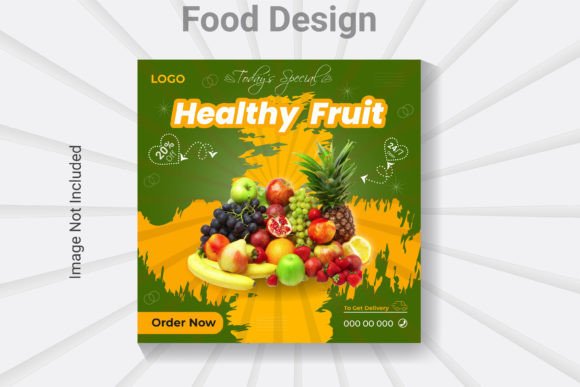
At its core, this specific design resource is built for precision and adaptability. It features an easy customizable and editable design structure, typically set at 500x500 pixels in RGB color mode. This square format is ideal for Instagram posts, Facebook updates, and Pinterest pins, providing a balanced canvas that highlights food photography without distraction. The files are prepared at 300 DPI resolution, which ensures that even though the primary use is digital, the clarity remains sharp on high-definition retina displays and can be repurposed for small-scale print materials like flyers or table tents if needed.
Why Structure Matters in Food Marketing
The value of using a well-layered and organized template cannot be overstated, but the reasons why vary significantly depending on who is using it. For a seasoned graphic designer, the priority might be efficiency and the ability to rapidly iterate on concepts for multiple clients. For a small business owner with no design background, the focus shifts entirely to ease of use and the confidence that the final result will look professional. A template that offers fully editable AI text, fonts, and colors bridges this gap, allowing users with different skill levels to achieve similar standards of quality.
When you download a package containing one AI file, one EPS file, and one JPG, you are getting versatility. The JPG serves as an immediate reference or a quick-use asset, while the vector-based AI and EPS files unlock the true potential of the design. Because the layers are logically named and grouped, users can isolate specific elements—such as a price tag, a descriptive caption, or a decorative border—without disturbing the rest of the composition. This organization is crucial for maintaining consistency when building a brand identity over time.
Perspectives from Different Creators
For Beginners and Hobbyists:
If you are just starting your journey as a food blogger or a hobbyist baker, the technical aspects of design software can feel intimidating. However, a template compatible with Adobe Illustrator CS6 or above removes much of the guesswork. Since the fonts used are free, there are no hidden costs or licensing hurdles to navigate. You can focus on the creative decisions, such as choosing colors that match the mood of your dish. For instance, a warm, rustic bread photo might pair well with earthy tones and a serif font, while a vibrant smoothie bowl might demand bright neons and a bold sans-serif. The template handles the layout heavy lifting, letting you learn design principles by doing rather than studying theory.
For Entrepreneurs and Small Business Owners:
Time is often the most scarce resource for restaurant owners and cafe managers. They need to announce daily specials or holiday hours quickly without compromising on brand perception. A customizable design allows them to swap out text and images in minutes. The reliability of a 300 DPI resolution means that if they decide to print a QR code menu or a small promotional sticker based on the social post, the quality holds up. The commercial value here lies in speed and consistency; customers begin to recognize the visual style of the posts, building trust and brand recall.
For Professional Marketers and Freelancers:
Agencies and freelancers managing multiple food brands require tools that offer flexibility and scalability. The inclusion of both AI and EPS formats ensures compatibility with various workflows and client requirements. An EPS file, for example, is universally accepted by many printing services and older design software, making it a safe bet for diverse project needs. Professionals appreciate the "well-layered" aspect because it allows them to create variations for A/B testing or adapting a single campaign across different social channels without rebuilding the graphic from scratch.
Evaluating the Technical Specifications
Understanding the technical details helps in deciding if this template fits your specific project type. The 500x500 pixel dimension is a standard square, but in the context of high-resolution screens, starting with a solid base allows for scaling. While the file is set to this size, vector elements within the AI and EPS files can be resized infinitely without losing quality. This is a critical distinction for users who might want to adapt the design for a story format (vertical) or a header (horizontal) later on.
The requirement of Adobe Illustrator CS6 or above ensures that the file utilizes modern features while remaining accessible to users who may not have the very latest subscription-based software. This inclusivity is important for students, educators, or professionals working in environments with older hardware. Furthermore, the use of free fonts eliminates the risk of copyright infringement, a common pitfall for businesses using unauthorized typography in commercial advertisements.
Practical Applications Across Industries
- Restaurants: Use the template to highlight "Chef's Specials" by simply changing the text layer and swapping the background image placeholder with a photo of the day's dish.
- Nutritionists and Educators: Create informative carousels about healthy eating habits, utilizing the clean layout to present data or tips clearly alongside appealing food imagery.
- Food Photographers: Use the template as a watermarking tool or a portfolio presentation frame to showcase their work professionally on social media.
- Event Planners: Adapt the design for catering menus or wedding food station signs, leveraging the high resolution for both digital invites and physical prints.
The decision to use a pre-designed template ultimately comes down to balancing creativity with efficiency. For some, the goal is to learn the ropes of vector editing; for others, it is purely about getting a job done effectively. A well-organized file structure supports both intentions. It encourages experimentation—you can change every color and font without breaking the design—while also providing a safety net of professional composition.
In a crowded digital landscape, the difference between a post that gets liked and one that gets ignored often lies in the presentation. A Social Media Post Food Design Template provides the structural integrity needed to make your content shine. Whether you are evaluating it for its learning value, its time-saving capabilities, or its aesthetic flexibility, the key is to ensure it aligns with your current workflow and future goals. By choosing a resource that is fully editable, layered, and compatible with standard industry software, you invest in a tool that grows with your skills and adapts to your evolving brand needs.