Evaluating the Nature Treasure 3D Text Effect for Adobe Illustrator
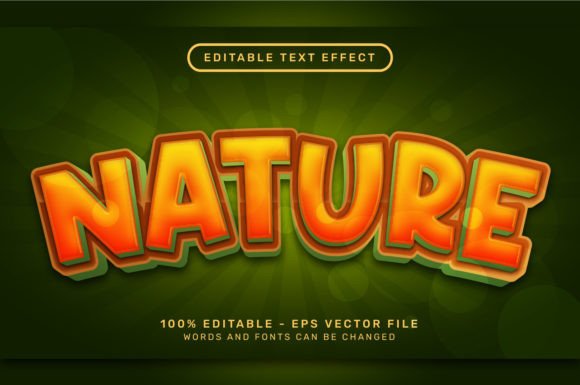
In the realm of graphic design, typography often serves as the focal point of a composition. Designers frequently seek methods to elevate standard text into three-dimensional assets that convey depth, texture, and thematic resonance without consuming excessive production time. The Nature Treasure 3D Text Effect represents a specific category of digital asset designed for Adobe Illustrator users who require high-fidelity, nature-inspired typographic styles. This resource functions as a pre-configured system of vector styles, allowing creators to apply complex visual treatments to editable text instantly.
Understanding the utility of such tools requires an objective look at what they offer, how they integrate into existing workflows, and where they fit within the broader landscape of design resources. This evaluation explores the technical specifications, practical benefits, and potential limitations of this effect to help designers determine if it aligns with their project requirements.
What Is the Nature Treasure 3D Text Effect?
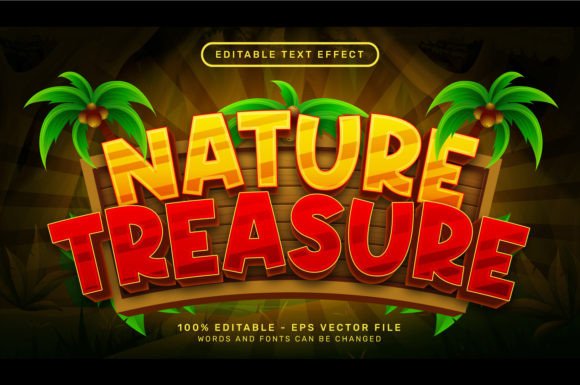
The Nature Treasure 3D Text Effect is a downloadable package containing vector-based graphic styles tailored for Adobe Illustrator. Unlike raster-based effects that rely on pixel manipulation, this tool utilizes Illustrator's native capabilities to render three-dimensional text with organic textures reminiscent of natural elements. The core of the product lies in its .EPS file format, which houses the necessary graphic styles.
Upon acquiring the file, users gain access to a high-resolution preview image (typically 7000 x 4000 pixels) and the primary vector source file. The mechanism of action is straightforward: the user opens the file, accesses the "Graphic Styles" panel via the Window menu, selects their desired text object, and clicks the specific style to apply the effect. Because the underlying structure is vector-based, the resulting text remains fully editable. Designers can change the font, alter the wording, or adjust the size without losing the integrity of the 3D rendering or needing to re-render the image.
Key Benefits for Design Workflow
The primary advantage of utilizing a pre-made effect like the Nature Treasure 3D Text Effect is efficiency. Creating convincing 3D text with organic textures from scratch in Illustrator is a labor-intensive process. It typically involves extruding shapes, mapping intricate artwork to 3D surfaces, managing lighting scenarios, and manually painting gradients to simulate depth. By leveraging a pre-built graphic style, designers bypass these technical hurdles.
No Additional Dependencies
A significant technical benefit of this specific package is its self-contained nature. Many third-party text effects require external plugins, custom actions, or linked texture maps that can break if files are moved or if the software version changes. This tool requires no additional textures, no recorded actions, and no plugins. Everything is contained within the vector file itself, ensuring compatibility and stability across different installations of Adobe Illustrator.
Scalability and Editability
Since the output is vector-based, the text can be scaled indefinitely without pixelation. This makes the effect suitable for both small web graphics and large-format print applications, such as signage or billboards. Furthermore, because the text remains live, clients or art directors can request copy changes late in the design process without forcing the designer to rebuild the entire effect.
Ideal Use Cases and Applications
This type of text effect is particularly well-suited for projects that demand an immediate connection to environmental or organic themes. Designers working on branding for eco-tourism agencies, outdoor adventure gear, natural food products, or conservation campaigns will find the "Nature Treasure" aesthetic highly relevant. The visual language suggests growth, earthiness, and value, making it a strong choice for headlines that need to stand out while reinforcing a brand's commitment to nature.
It is also a valuable asset for social media content creators and YouTubers who need to produce consistent, high-quality thumbnails quickly. In these fast-paced environments, the ability to swap text while maintaining a polished, professional 3D look can significantly reduce turnaround time.
Considerations and Tradeoffs
While the convenience of pre-made styles is undeniable, there are tradeoffs that designers must consider before integrating this tool into their workflow.
- Customization Limits: While the text content and font are editable, the fundamental texture and lighting of the 3D effect are fixed within the graphic style. If a project requires a specific variation of the texture—such as changing the moss color to a specific brand hue or altering the direction of the light source—the user may need to expand the appearance and manually edit the vector paths, which can be time-consuming and defeat the purpose of using a shortcut.
- Software Dependency: This tool is exclusive to Adobe Illustrator. Users working in Affinity Designer, CorelDRAW, or web-based tools like Canva cannot utilize the .EPS graphic styles directly. Migration to other platforms would require recreating the effect from scratch or exporting the result as a flattened image, losing the vector benefits.
- Aesthetic Specificity: The "Nature Treasure" theme is niche. While versatile within its lane, it may not suit corporate, technological, or minimalist design projects. Overusing such distinct stylistic presets can sometimes lead to a generic look if not carefully integrated with other custom design elements.
Comparison with Alternatives
When deciding whether to use the Nature Treasure 3D Text Effect, it is helpful to compare it against alternative methods of achieving similar results.
Manual Creation in Illustrator:
Building the effect manually offers total control over every gradient stop and extrusion angle. However, this approach requires advanced proficiency in Illustrator's 3D and Materials panel. For junior designers or those under tight deadlines, the learning curve and time investment may not be justifiable compared to using a pre-set.
Photoshop Layer Styles:
Some designers might attempt to replicate this look using Photoshop layer styles. While Photoshop excels at raster textures, the result will not be scalable vector art. For print projects requiring crisp edges at any size, the Illustrator-based Nature Treasure effect is superior. However, for web-only use where file weight is less of a concern and complex photo-blending is needed, Photoshop might offer more flexibility in compositing.
Other Vector Marketplaces:
There are numerous text effect packs available online. When evaluating this specific pack, the key differentiator is the "no plugin, no action" requirement. Many competitors rely on automated scripts that can fail or become obsolete with software updates. A pure vector graphic style solution is generally more future-proof.
Making the Decision
Determining whether the Nature Treasure 3D Text Effect is the right choice depends largely on your current project constraints and skill set. If you are an Adobe Illustrator user looking to accelerate your workflow for nature-themed projects, and you value the ability to deliver editable vector files to clients, this tool provides a logical solution. It effectively bridges the gap between high-end custom illustration and rapid prototyping.
However, if your work demands highly unique, non-standard lighting scenarios or if you operate outside the Adobe ecosystem, the limitations of a preset style may outweigh the benefits. Ultimately, assets like this should be viewed as components in a larger toolkit—powerful when used appropriately to solve specific problems, but not a replacement for fundamental design judgment. By understanding the balance between convenience and customization, designers can leverage these effects to enhance their creative output without compromising on quality or originality.